What could AI actually do for you?
Most people still use AI the way they did three years ago: they ask, it answers. That's only the first step. There are two more.
- It answers. You ask a question or for a draft, and you do the rest.
- It takes on a piece of work. You give it a goal. It goes through your emails and files, works out how things fit, and hands you the result.
- It handles a whole process. It keeps something moving over days or weeks, within your instructions, and comes to you only when a decision is yours.
Here are three everyday situations that show what that changes.
- A charge for a subscription you cancelled
- A year of expenses for your accountant
- Several clients, and no single place to see them
- Find your own situation
01 · It handles a process
Things no longer have to depend on your attention.
You get charged for a subscription you cancelled months ago. Now you have to find the cancellation email, contact the company, explain, wait, and remember to follow up. Even when you're not doing anything about it, it sits at the back of your mind.
Now imagine handing over the whole thing. You explain it once:
"Get my money back. Keep track of it, and ask me before sending anything."
- Monday. It finds the cancellation confirmation and the invoice, and drafts the refund request with the proof attached.
You approve the email. - Wednesday. The company replies and asks for a document. It finds it and drafts the answer.
You approve it. - Friday. No news. It prepares a follow-up.
- Next Monday. The refund is confirmed.
You check the money arrived.
You don't reopen the chat every day or decide each next step. It keeps going after you close it.
The same works for anything you'd otherwise keep checking: your inbox, unpaid invoices, a problem that isn't solved yet, new opportunities in your field.
An illustration, not a live demo. Setting this up means connecting your email and testing it together first.
Less to do, and less to think about.
02 · It takes on a piece of work
Your information starts working together.
Your accountant needs a year of professional expenses by next week. Some invoices are in your email, others on your computer. There are files in Google Drive, payments in two spreadsheets, a few notes on your phone. Writing the report is the easy part. Finding and matching everything is what takes days.
Instead, you hand over the whole assignment:
"Put together my expenses for the past year, find the supporting documents, tell me what's missing, and prepare a report and a spreadsheet for my accountant."
It goes through your email, files, Drive and spreadsheets. It matches each invoice to a payment, spots duplicates, adds up the totals and lists what's missing or unclear. You get:
- the report;
- a spreadsheet with amounts, categories and a link to each original;
- a short list of things to clarify.
You check the totals and the open questions before anything goes to your accountant.
This isn't summarising a PDF. It's the searching, matching and checking you'd otherwise do yourself. Same idea for your medical history before seeing a new doctor, an insurance claim, or a project you've taken over from someone else.
You spend your time understanding the situation, not putting it together.
03 · It builds what you need
Your tools adapt to you, instead of the other way around.
You work with several clients. Each has meeting notes, documents, goals, deadlines and invoices, and after every meeting you update it all in three different places. You've probably thought: I wish I had one place that shows everything the way I need it.
Until recently that meant hiring a developer. Today you can build it yourself, around how you work. Here's an example, built with AI: a dashboard for a freelancer with four clients.
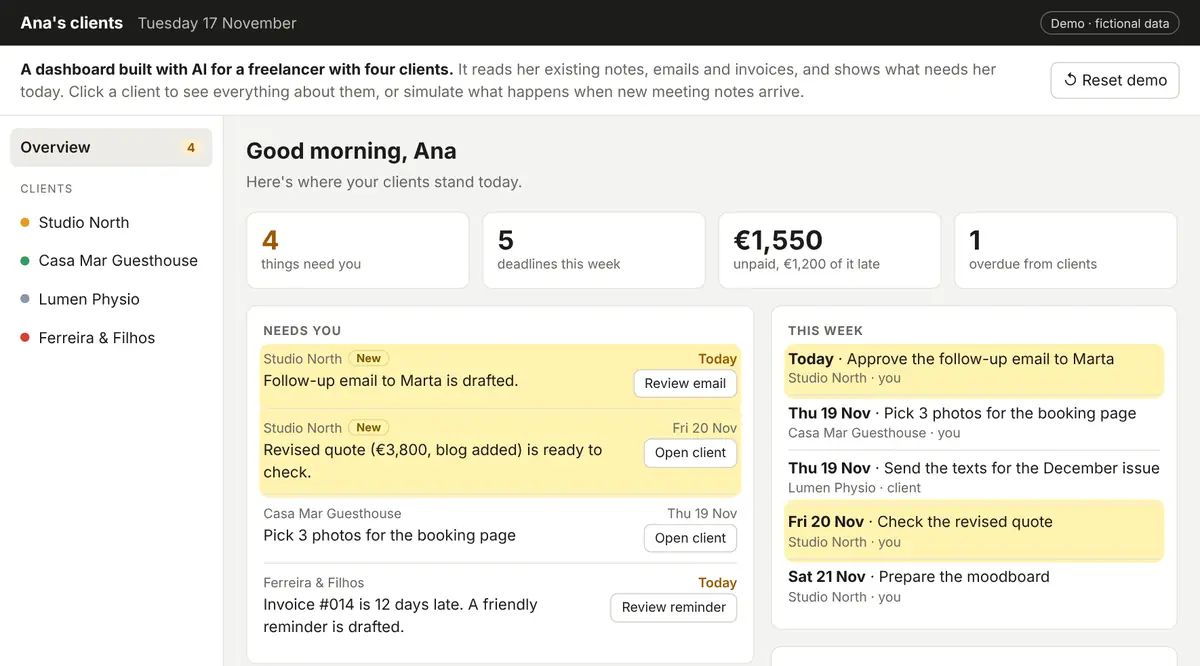
What you see. What needs you today, this week's deadlines, what's unpaid, and where every client stands. Click a client to see their goal, decisions, next steps, documents and money.
Where it comes from. Your files stay where they are: notes in Google Drive, invoices in your spreadsheet, emails in your inbox. The dashboard reads them and shows them the way you need.
How it stays up to date. When new meeting notes arrive, AI reads them, updates the client's status, next steps and deadlines, and drafts the revised quote and the follow-up email. You approve before anything goes out.
Press "Simulate new meeting notes" and watch it update. Fictional data, nothing is sent.
The same goes for your personal finances, a project, or a small app for a problem only you have. And when you need a new view, you change the tool.
Tools that fit the way you work.
Now put the three together. New information comes in, AI takes care of what follows, and the tools you use stay up to date. Less to manage, more time, and things you couldn't do before.
What you can hand over depends on your tools, your plan and the access you give. Important decisions always stay with you.
Which situation sounds like your week?
Or send me a message on Instagram. I answer every message myself.